
Do you ever just stop and marvel at how much the internet has changed human existence? At no other time in history has the average person had access to so much knowledge. Yes, we use it for dumb things too, but anyone with an internet connection can learn anything they set their mind to, from languages to auto mechanics to music to rocket science. It’s mind-blowing.
This unlimited access to information is amazing, but it can also be overwhelming. If I Google “rocket science,” I get 190 million results in 0.7 seconds. If I actually had an interest in learning about rocket science—which I don’t—I wouldn’t even know where to begin.
I could narrow down those results with more specific search terms, of course. But that would barely be scratching the surface of Google’s search abilities. As Chris Hladczuk wrote on Twitter, “If you use it right, Google is the most powerful tool in the world. But the truth is most people suck at it.”
It’s true. Many of us have no idea how to actually utilize Google effectively to find the information we want or need. I use Google all the time and thought I was pretty good at it, but after reading Hladczuk’s thread of tips and researching more, I realized there are so many ways I could up my Google game to save myself some time and effort.
Here are 13 tips and tricks for better Googling that we can all use:
1. Make use of the one-click filters that Google already set up.
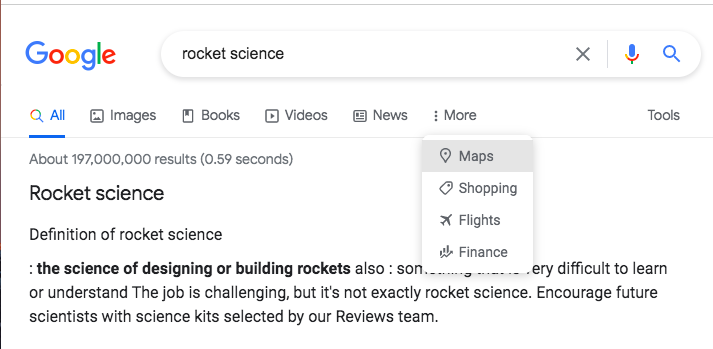
Google makes it easy to narrow down search results with pre-set filter categories that show up at the top of your search results. This may seem like a no-brainer, but it’s easy to gloss over them if you don’t know they’re there. If you just want news stories or just want images for your search topic, you’d click “News” or “Images” at the top of the search results page.
To further filter, click “Tools” on the right. Depending on what other filters you’re using you can sort by date (in News), type of document (in Books), duration or quality (in Videos), and so on. Just utilizing these built-in filtering tools will greatly enhance your Google search experience with very little effort.
2. Use the minus sign (-) to eliminate words you don’t want in your results.
Let’s say you want to research George Bush’s presidency but you want the first Bush, not George W. Bush. You could Google “George H.W. Bush,” but that’s not generally what he was referred to prior to his son running for president.
Using the hyphen, or minus sign, before a word or phrase you don’t want included in results will eliminate that word or phrase from the search. So Googling “George Bush -W.” tells Google to pull up results for George Bush, but without “W.” Voila! All senior Bush results.
3. Quotations marks (” “) give you exact phrase results.
Googling multiple words at once can give you a mixed bag of results. The search will include all of the words, but not necessarily in order. If you are looking for an exact phrase, let Google know that by putting it in quotation marks.
4. Use a colon (:) to search a specific website.
Let’s say you wanted to see all of Upworthy’s articles about dogs. Type in “dogs:upworthy.com” and Google will give you all of our pupworthy content. (Generally speaking, you should put in the .com or .org or whatever the extension is on the URL, but “dogs:upworthy” works, too.)
5. Looking for a specific file type? Tell Google with (filetype:).
Do you swear you saw a printable PDF of dad jokes, but can’t remember where you found it? A search for “dad jokes” gives you a gazillion results you’d have to wade through to find a PDF. But you can search just for PDFs by typing “bad dad jokes filetype:PDF” into your Google search bar.
6. Search for similar or synonymous terms with a tilde (~).
Say you wanted to find a Spanish teacher in your area. Searching “local Spanish ~teacher” would also bring up search results for Spanish tutors, instructors and so on. (Google does some of this intuitively, but there may be instances when results are too honed in on one word.)
7. Do a fill-in-the-blank search with an asterisk (*).
Want to know what percentage of Americans have been vaccinated for COVID-19? Want to know how many gorillas are left in the wild? A search for “* percent of Americans vaccinated for COVID” and “* gorillas left in the wild” will bring those exact numbers right to the top of your results.
8. Calculate a tip or set a timer in a jiffy.
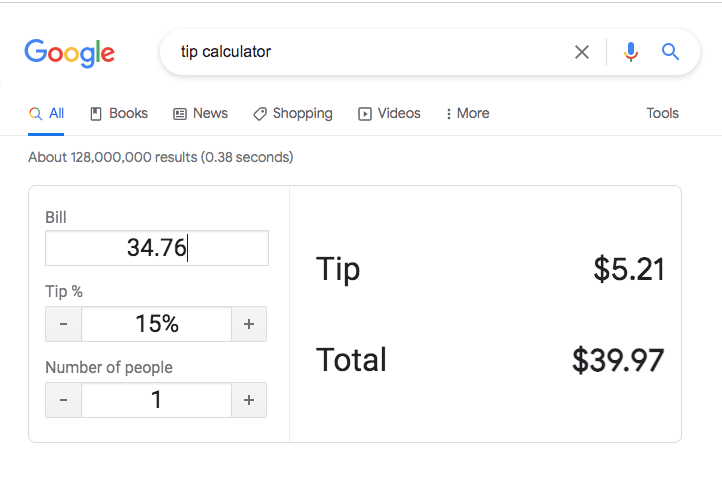
Searching for “tip calculator” brings up a simple, handy tip calculator without having to click through to any website. Nifty.
And you can set a timer by typing “timer” and however many minutes you want into the search bar. The timer starts automatically and will beep when finished. (Just don’t close that browser window.) You can also pull up a stopwatch with a simple “stopwatch” search.
9. Track a package without having to go to the carrier’s website.
All you have to do is copy and paste any tracking number into the Google search bar. No need to go to USPS or UPS or FedEx websites first. Just straight to Google.
10. Track a flight without having to go to the airline’s website.
Just like the tracking number, simply enter your flight number (e.g., DL 275) into the Google search bar. Easy peasy.
11. Do quick definition checks and look up time and weather in different places.
Sometimes Google is more intuitive to use than we might assume. Want to look up what “obfuscation” means? No need to search for an online dictionary. Just type “define obfuscation” into the search bar. (You don’t even have to spell it right, as long as you’re close.) Wondering what the weather’s like where grandma lives? Search “weather Orlando” to get current conditions. Need to know if it’s too late to contact that friend overseas? Search “time Barcelona” to get the current local time.
12. Search for free-to-use images with Creative Commons licenses across multiple websites at once.
Finding photos that are free to use, either with or without attribution requirements, can be tedious. But it’s easy to find Creative Commons License photos on Google if you know what to click.
Type in your search term for whatever images you want (say “snuggly kittens”), then click Images, then Tools, then Usage Rights, then Creative Commons Licenses.
(Quick reference: Images > Tools > Usage Rights > Creative Commons Licenses)
When you click on an image, you can click “License details” and it will tell you which Creative Commons license applies to the photo so you know how to attribute it.
13. Reverse search images to see where they came from or where else they’ve been shared.
If you want to try to track down where an image originated, you can search using an image itself, either using the image URL or uploading it to images.google.com. Just click on the camera icon and either paste the URL or upload the image, and the search results will show you all the places the image lives on the internet.
Bonus: Just for fun, try typing “askew” into the Google search bar.
The folks behind the scenes at Google have a silly sense of humor, so you never quite know what you’re going to get when you use it. You can also put “play pacman” into the search and actually play a mini Pac-Man game. Who knew?
Google is an incredibly useful tool in far more ways than most of us use it, and hopefully these tips will help you utilize it to its full potential. Happy searching and three cheers for digital literacy!